

Many creators of sports videos frequently encounter a dilemma: quick social media filters offer speed but seldom resolve core quality issues, while professional editing software provides superior results at the cost of time and powerful hardware. This leaves numerous teams seeking better visual quality without disrupting their workflow.
Vmake emerges as a web-based AI video enhancer designed to rapidly refine video clips for everyday use. Its purpose isn’t to replace comprehensive professional editing suites, but rather to efficiently correct common problems like blurry faces, visual static, cluttered backgrounds, and heavily compressed files. This makes it an ideal tool for managing regular content production volumes.
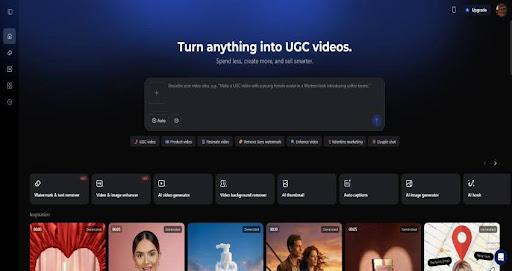
Vmake’s Role in Enhancing Sports and Marketing Videos
The Vmake Video Enhancer focuses primarily on efficiently upscaling videos to 4K. Often, compelling sports footage fails to impress due to poor visual quality, such as blurriness or graininess, rather than weak content. Mobile recordings, highly compressed files, or older video assets frequently appear soft or distorted. Traditionally, rectifying these issues required robust computing power and extensive professional editing expertise.
Vmake addresses this need through its automated enhancement capabilities, which operate entirely within a web browser. Users can upload files, have them processed automatically, and receive enhanced versions ready for immediate use.
The platform emphasizes three core areas:
- Improving resolution for low-quality footage.
- Cleaning up visuals, particularly for faces and product close-ups.
- Isolating backgrounds, suitable for e-commerce and advertisements.
Busy teams leverage Vmake for social media clips, product demonstrations, explainer videos, or repurposing old files, offering a streamlined alternative to labor-intensive, feature-film-style post-production.
Key Features for Practical Video Quality Improvement

Automated Video Quality Improvement
The quest for higher resolution is a primary reason users turn to tools like Vmake. It enables pushing clips to 4K resolution using an intelligent system that analyzes each frame and intelligently reconstructs missing details. This feature is particularly effective for footage initially shot in good lighting but degraded by compression or multiple export cycles. The result is cleaner edges, more readable text, and polished product close-ups. With no complicated settings to manage, the enhancement process remains consistently fast.
Clearer Faces Without Over-processing
Faces are often the most affected by video compression. Vmake employs facial restoration models that specifically target eyes, skin texture, and facial contours. For ‘talking-head’ videos, this yields a refined appearance without the artificial look of heavy cosmetic effects.
In most scenarios, the enhancement appears natural, preserving consistent skin tones and authentic expressions. However, in certain complex scenes involving rapid motion or inadequate lighting, a degree of over-smoothing might occur. This is a common limitation with automated enhancement technologies and is worth acknowledging.
Efficient Background Removal and Cleanup
Background removal is another standout capability of Vmake. Instead of relying on traditional green screens or laborious manual masking, the system automatically isolates subjects. This feature proves highly effective for:
- Videos showcasing products.
- Listings for e-commerce platforms.
- Tutorial clips where visual distractions need elimination.
The resulting edges are sufficiently clean for most commercial applications, and options for background replacement ensure visual consistency across various marketing campaigns.
Streamlined Workflow: From Upload to Export
Vmake operates entirely online, negating the need for any software downloads or updates. This browser-based design significantly impacts usability. Videos can be uploaded from any device, quickly processed, and exported without the complexities of managing local storage or system compatibility.
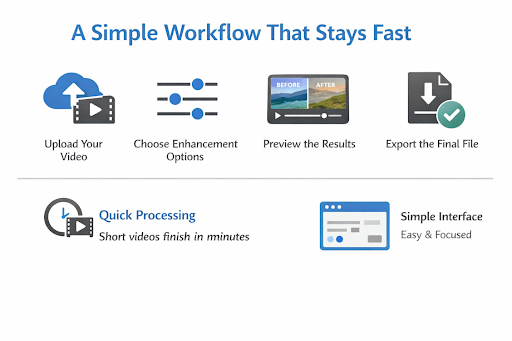
The general workflow follows a straightforward sequence:
- Upload the video file.
- Select the desired enhancement options.
- Preview the enhanced results.
- Export the final version.
Processing times vary depending on video length and resolution, but most short videos are completed within minutes. This rapid turnaround makes Vmake highly practical for teams engaged in daily content production rather than occasional projects.
The interface is designed for clarity and efficiency, limiting settings to essential options and thereby reducing decision fatigue. While this implies less granular control compared to professional-grade tools, this tradeoff aligns perfectly with Vmake’s core objective.
Real-World Performance Analysis
Where Vmake Excels
Vmake performs exceptionally well with standard marketing footage. Product showcases, presenter videos, and social media clips consistently show immediate and noticeable improvements. Facial enhancements appear well-balanced, and background isolation maintains good integrity even with moderate subject movement.
The tool also adeptly handles batch processing, allowing multiple videos to be enhanced without significant performance degradation, a crucial factor for large-scale campaigns or catalog updates.
Recognized Limitations
No automated enhancer is without its imperfections. Vmake can occasionally introduce over-smoothed textures in scenes characterized by fast motion, poor lighting, or high grain. Fine details like hair or intricate patterns might lose some sharpness.
These artifacts are generally subtle for most common use cases, though professional editors working on cinematic-quality footage might perceive them. For short-form content primarily viewed on mobile devices, such minor compromises are often acceptable.
Value Proposition and Cost Efficiency
Vmake is positioned within a practical price bracket, making it sensible for individuals and teams who regularly produce content but don’t operate a full-fledged post-production studio. Its cost is typically lower than advanced tools like Topaz Video AI, which, despite delivering impressive results, necessitate local installation, robust hardware, and a considerable learning curve for detailed controls—a level of depth often unnecessary for general workflows.
Concurrently, Vmake provides more substantial visual enhancements than general design platforms such as Canva.
Why Teams Opt for Vmake
The primary appeal of Vmake lies in its seamless integration into day-to-day production. There’s no need for investments in expensive equipment or constant software updates. Everything functions within the browser, ensuring a lightweight and flexible process.
Several practical advantages stand out:
- No dependence on high-end hardware or local storage.
- Rapid processing times keep projects on schedule.
- Features specifically designed for product videos, advertisements, and online listings.
A Balanced Intermediate Solution
For small businesses and marketing departments, this approach is highly logical. High-end software often goes underutilized, while entry-level applications struggle to deliver clean, professional output. Vmake comfortably occupies this middle ground, offering quality improvements that justify its cost without introducing workflow complexities.
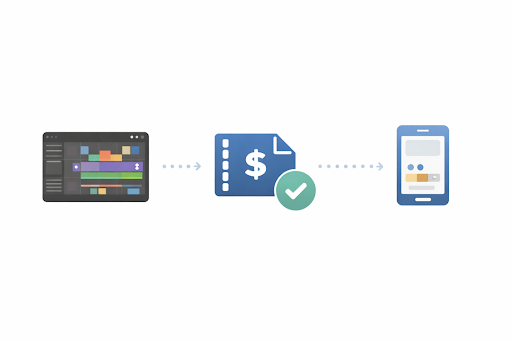
Vmake in Daily Production Workflows
Vmake distinguishes itself through its emphasis on speed and practical, usable output. It doesn’t attempt to rival professional restoration tools frame-by-frame but consistently delivers reliable improvements with minimal effort.
While Topaz Video AI offers more profound control and potentially higher quality, it demands powerful hardware and specialized technical knowledge. Canva provides basic enhancement features but lacks true restoration models and advanced background manipulation capabilities.
Vmake carves out its niche around efficiency, providing results that meet modern platform standards without requiring advanced editing expertise.
Conclusion
Vmake Video Enhancer’s success stems from its clear understanding of its place within the content creation ecosystem. It prioritizes dependability and simplicity over pursuing absolute perfection or excessive complexity. Instead, it offers reliable visual enhancements through a fast, browser-based experience.
For marketers and small business teams who produce video content frequently, this tool provides a distinct efficiency advantage. It elevates visual quality without impeding production timelines, all while maintaining a minimal learning curve.
As an effective middle-ground solution, Vmake integrates smoothly into numerous production workflows. It successfully bridges the gap between casual video filters and demanding professional software, delivering quality results that align with real-world production demands rather than idealized editing environments.